

Introduction
Manufacturing companies often deal with partially completed goods that are not yet finished products. These items are known as Work-in-Progress (WIP). Tracking WIP correctly is critical for accurate costing, inventory valuation, and production planning.
Many businesses use SAP Business One (SAP B1) to manage manufacturing operations. However, understanding How to Track Work-in-Progress (WIP) in SAP B1 can sometimes feel confusing for new users.
When implemented correctly, WIP tracking in SAP B1 helps businesses:
- Monitor production costs
- Track unfinished goods
- Improve financial reporting
- Increase operational efficiency
This guide explains How to Track Work-in-Progress (WIP) in SAP B1 step-by-step using clear explanations and practical tips.
Understanding Work-in-Progress (WIP) in Manufacturing
Before exploring How to Track Work-in-Progress (WIP) in SAP B1, it’s important to understand what WIP means.
Work-in-Progress refers to:
- Products that have started production but are not finished
- Materials already consumed in production
- Labor and overhead costs added during manufacturing
For example:
| Stage | Example |
|---|---|
| Raw Material | Steel sheets |
| Work-in-Progress | Steel sheets cut and partially assembled |
| Finished Goods | Completed machine part |
WIP exists between raw materials and finished goods in the production cycle.
Proper tracking ensures businesses know:
- The exact production cost
- Inventory value
- Manufacturing progress
Why Tracking WIP is Important in SAP B1
Tracking WIP correctly in SAP Business One provides several advantages.
1. Accurate Financial Reporting
Without WIP tracking, production costs may appear incomplete. WIP allows companies to record expenses before the final product is completed.
2. Inventory Visibility
Managers can see:
- Which items are currently being produced
- How much material has been consumed
- What stage production is in
3. Better Cost Control
Tracking WIP helps identify:
- Excess material usage
- Production inefficiencies
- Unexpected manufacturing costs
4. Production Planning
Production managers can analyze WIP levels to prevent:
- Bottlenecks
- Overproduction
- Material shortages
Key Components of WIP Tracking in SAP Business One
To understand How to Track Work-in-Progress (WIP) in SAP B1, you must know the main system components involved.
Production Orders
Production Orders represent manufacturing activities in SAP B1.
They include:
- Raw materials required
- Production stages
- Finished goods output
Bill of Materials (BOM)
A Bill of Materials defines:
- Components needed
- Quantities required
- Production structure
Inventory Accounts
SAP B1 uses different accounts for inventory tracking:
| Account TypePurpose | |
| Raw Material | Stores raw materials |
| WIP Account | Tracks partially produced goods |
| Finished Goods | Records completed products |
Issue for Production
This process moves materials from raw inventory into production.
Receipt from Production
This process moves finished goods from production into finished inventory.
System Setup for WIP Tracking in SAP B1
Before learning How to Track Work-in-Progress (WIP) in SAP B1, the system must be configured correctly.
Step 1: Enable Production Module
First, ensure the Production Module is active in SAP B1.
Navigate to:
Activate the Production module if it is not enabled.
Step 2: Define WIP Accounts
SAP B1 requires proper accounting setup.
Go to:
Assign accounts for:
- Raw Material Inventory
- WIP Inventory
- Finished Goods Inventory
These accounts ensure production transactions are recorded correctly.
Step 3: Create Bill of Materials (BOM)
BOM defines how a product is manufactured.
Navigate to:
Enter:
- Parent item (finished product)
- Component items (materials)
- Required quantities
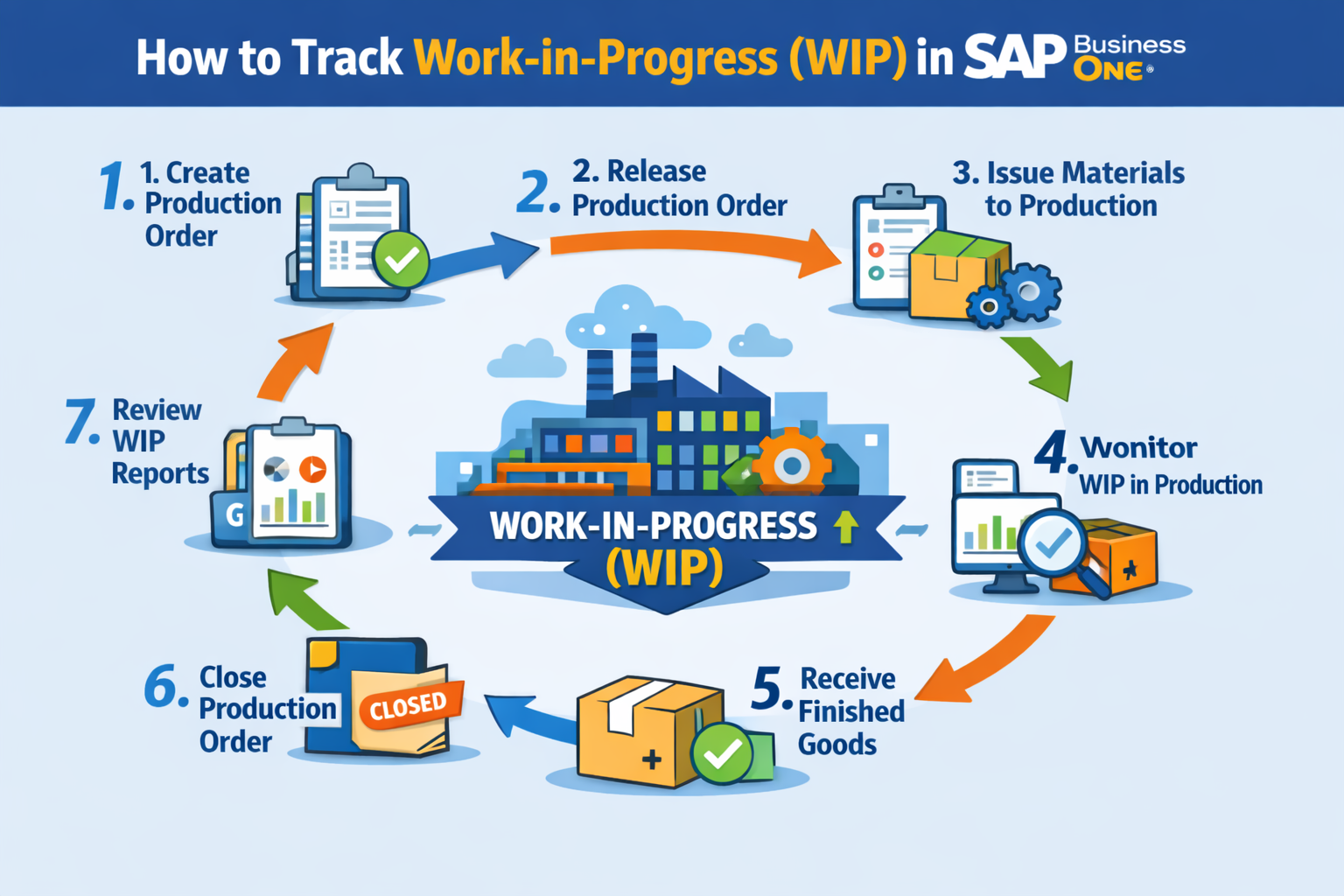
Step-by-Step Guide: How to Track Work-in-Progress (WIP) in SAP B1
Now let’s walk through the full process.
Step 1: Create a Production Order
Production orders initiate manufacturing.
Navigate to:
Enter:
- Product code
- Quantity to produce
- Production date
The system automatically pulls material requirements from the BOM.
Step 2: Release the Production Order
Once approved, the order must be released.
Production order status changes from:
Only released orders allow material consumption.
Step 3: Issue Materials to Production
Next, raw materials are issued to production.
Navigate to:
Select the production order.
When materials are issued:
- Raw material inventory decreases
- WIP account increases
This step officially moves materials into the Work-in-Progress stage.
Step 4: Monitor WIP During Production
While production is ongoing, items remain in the WIP stage.
You can track them using:
- Production Order reports
- Inventory audit reports
- WIP accounts in the general ledger
These tools show:
- Materials consumed
- Production progress
- Current WIP value
Step 5: Receive Finished Goods from Production
Once manufacturing is complete, record the finished goods.
Navigate to:
This action:
- Reduces WIP inventory
- Increases Finished Goods inventory
Step 6: Close the Production Order
After production is completed and goods are received, close the order.
Change status to:
This prevents additional transactions on the order.
Step 7: Review WIP Reports
SAP B1 provides reports to analyze WIP.
Key reports include:
| Report | Purpose |
|---|---|
| Production Order Report | Shows manufacturing progress |
| Inventory Audit Report | Tracks inventory value |
| WIP Balance Report | Displays partial production costs |
These reports help finance teams validate production costs.
Best Practices for WIP Tracking in SAP B1
To ensure accurate tracking, follow these best practices.
Maintain Accurate BOMs
Incorrect BOM data leads to incorrect WIP values.
Always verify:
- Material quantities
- Item codes
- Units of measure
Update Production Orders Regularly
Production orders should reflect real manufacturing progress.
Update them whenever:
- Materials are issued
- Production stages change
- Products are completed
Perform Regular Inventory Reconciliation
Regular inventory checks help identify:
- Missing materials
- Incorrect WIP values
- System inconsistencies
Train Production and Accounting Teams
WIP tracking involves both departments.
Teams must understand:
- Production transactions
- Accounting impacts
Common Challenges in WIP Tracking
Companies often face several issues when implementing WIP tracking.
Incomplete Production Orders
If orders remain open without completion, WIP balances become inaccurate.
Incorrect Material Issuance
Issuing wrong quantities affects production costing.
Lack of Real-Time Updates
Delayed updates lead to outdated inventory information.
Improper Account Configuration
Incorrect financial accounts may cause accounting errors.
Proper system configuration solves most of these problems.
Integration with Financial Accounting
WIP tracking directly impacts accounting.
When materials move through production:
| Transaction | Accounting Impact |
|---|---|
| Issue for Production | Debit WIP / Credit Raw Material |
| Receipt from Production | Debit Finished Goods / Credit WIP |
This ensures production costs are recorded accurately in financial reports.
Advanced WIP Tracking Techniques
Large manufacturers may use additional tools for deeper insights.
Production Stage Tracking
SAP B1 allows monitoring different production stages such as:
- Cutting
- Assembly
- Quality control
Labor Cost Allocation
Labor expenses can also be added to WIP to calculate full production cost.
Overhead Allocation
Manufacturing overhead (utilities, machine usage) can be included in product costing.
These techniques improve cost accuracy.
Frequently Asked Questions (FAQs)
1. What is Work-in-Progress in SAP Business One?
Work-in-Progress refers to partially completed products that have consumed materials but are not yet finished goods.
2. How does SAP B1 record WIP transactions?
SAP B1 records WIP when materials are issued to production and transfers the value to finished goods once production is completed.
3. Which SAP B1 module handles WIP tracking?
The Production Module manages WIP through production orders, material issues, and production receipts.
4. Can SAP B1 track WIP automatically?
Yes. When production orders, BOMs, and inventory accounts are configured correctly, SAP B1 automatically tracks WIP values.
5. What reports help monitor WIP in SAP B1?
Common reports include:
- Production Order Report
- Inventory Audit Report
- Financial General Ledger Reports
6. Why is WIP tracking important for manufacturers?
WIP tracking improves:
- Cost accuracy
- Inventory control
- Production visibility
- Financial reporting
Conclusion
Understanding How to Track Work-in-Progress (WIP) in SAP B1 is essential for manufacturers who want accurate production costing and inventory control.
By using production orders, BOMs, issue for production, and receipt from production, SAP Business One allows businesses to monitor every stage of manufacturing.
When implemented correctly, WIP tracking helps companies:
- Improve cost visibility
- Prevent production inefficiencies
- Maintain accurate financial records
- Optimize manufacturing operations
With proper configuration and disciplined processes, SAP B1 becomes a powerful tool for managing work-in-progress and achieving better production control.